Running Multiple Claude Code Accounts with herdr
I have two Claude Code accounts. One is my work account; the other is a personal account I got through Anthropic’s Claude for Open Source program as the maintainer of DuckDB.NET and EntityFramework.Exceptions. For a while I kept them in separate terminal windows and regularly lost track of which window was which. What I actually wanted was to run both at once - sometimes several agents in parallel - without juggling windows or logging in and out.
That is what pushed me to herdr. herdr is a terminal multiplexer: it splits one terminal window into many panes and tabs, each running its own shell. But it is built specifically for AI coding agents. If you have used tmux, it is in that family. If you have not, picture a single window hosting a dozen independent terminals that keep running even after you close it.
What makes it worth reaching for with Claude Code is that it understands the agents inside it. Every pane shows its agent’s state at a glance - idle, working, blocked on a question, or done. So I can keep several going at once and see which one needs me. It even ships a skill for Claude Code, so Claude can drive herdr itself - opening panes, starting agents, and reading their output.
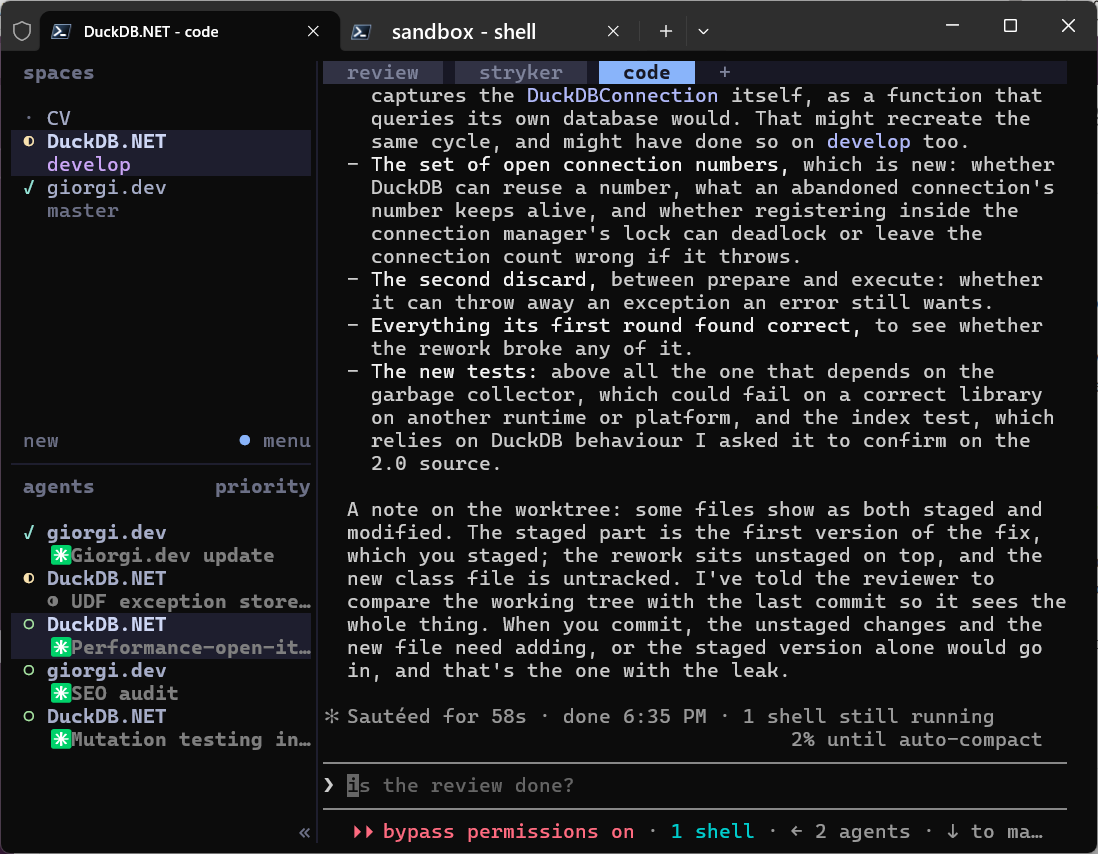
And its sessions are persistent background servers: I can detach, close the terminal, come back later (even from another machine), reattach, and the agents are still there, mid-task. That is exactly what I wanted for running a wall of Claudes. The only question was how to make one of them “work” and another “personal.”
An account is just a config directory
The key realization is that a Claude Code account is not some global login - it is whatever lives in its config directory. Claude Code reads the CLAUDE_CONFIG_DIR environment variable, and everything that makes an account an account - its credentials, its settings, its stored conversation transcripts - lives in that folder. Point CLAUDE_CONFIG_DIR at one folder and you are your work account; point it at another and you are personal.
I manage the two with
ccs, a small profile switcher for Claude Code. ccs work and ccs personal each launch Claude with the right config directory. When I asked it what a profile actually does under the hood, the answer was refreshingly small:
> ccs env work --format raw
$env:CLAUDE_CONFIG_DIR = 'C:\Users\me\.ccs\instances\work'
That is the whole trick. A profile is one environment variable.
One herdr session per account
herdr supports named, persistent sessions - independent background servers that you attach to. That maps perfectly onto accounts: a work session and a personal session. You attach to one with:
herdr session attach work
So I set CLAUDE_CONFIG_DIR for the work account, attached the work session, launched a few Claudes across its panes, and everything was my work account. Lovely.
And then I restarted herdr.
The agents came back as the wrong account
herdr has a feature called native session restore: when its server restarts, it relaunches the agents that were running and resumes their conversations. Except after a restart, my work agents came back logged in as my personal account - and could not find the conversations they were supposed to resume.
It took me a minute to see why. herdr restores an agent by running a fixed command, essentially claude --resume <id>. That command inherits the environment of the herdr server - not whatever environment the pane was launched in. My account was coming from ccs at the moment each pane started; the server itself knew nothing about it.
I confirmed it by spawning a throwaway pane and printing the one variable that matters:
> # inside a fresh pane the herdr server started for me
> $env:CLAUDE_CONFIG_DIR
>
Empty. The server had no account set, so every restored claude --resume fell back to the default (personal) account. Each account’s transcripts live inside its own config directory. So a work conversation id does not even exist under the personal account - the resume could not find it either. Wrong account and a dead resume.
The fix: scope the session’s server, not the pane
Once I understood that restore inherits the server’s environment, the fix was obvious: start each herdr session’s server with CLAUDE_CONFIG_DIR already set. Then everything the server later spawns - new panes and restored agents alike - inherits the right account.
Since ccs env just emits that one variable, I can apply it right before attaching the session. I wrapped it in a small launcher:
# start-herdr.ps1 - launch a herdr session scoped to a Claude account.
#   .\start-herdr.ps1          # default session, default (personal) account
#   .\start-herdr.ps1 work     # 'work' session scoped to the ccs 'work' profile
param([string]$Account)

if (-not $Account) {
    herdr                      # default session + default account
    return
}

# Apply the account's CLAUDE_CONFIG_DIR, then attach the same-named session so the
# server - and everything it spawns, including restore - inherits that account.
ccs env $Account --format raw |
    Where-Object { $_ -match '^\s*\$env:' } |
    Invoke-Expression

herdr session attach $Account
(The Where-Object filter is there because on its very first run ccs env can print a one-line status message alongside the assignment. Keeping only the real $env: line stops Invoke-Expression from choking on it.)
One catch worth knowing: session attach only sets the server’s environment when it starts the server. If the session is already running - launched the old, unscoped way - attaching again will not re-scope it. You have to herdr session stop <name> first, then relaunch with the script.
With that in place, I get exactly what I wanted:
start-herdr.ps1 work- a herdr session where every pane is my work account, and restore brings agents back on the work account.start-herdr.ps1 personal- the same for my personal account.- A bonus I did not expect: the account lives on the server, so every new pane, tab, and spawned agent inherits it. I can fan out reviewers into new tabs - or let Claude spawn them via herdr’s skill - and every one is the right account, no
ccsneeded.
Where I landed
Two accounts, two herdr sessions, one launcher - and session restore that no longer sends my work agents off as my personal self. herdr plus a one-variable launcher turned out to be a much calmer way to live than juggling terminal windows.
And none of this is Claude-specific. herdr detects and drives other coding agents too - Codex, Gemini, and more - so the same one-session-per-context setup works whatever you run inside it.
If you are juggling more than one agent or account, give herdr a try. And if you reach for multiple accounts, remember the rule that caught me: restore inherits the server’s environment, so scope the server, not the pane.