DuckDB.NET 1.5.6.1: Appending Dates Up to 27× Faster

Introduction
DuckDB.NET, the .NET client for the DuckDB in-process analytical database, appends DateTime values 15 to 27 times faster in version 1.5.6.1. Allocations for a million rows drop from 2.8 GB to under 0.1 MB. Reading dates and times no longer calls into DuckDB for every value, which makes it 3 to 12 times as fast. Numeric appends are 1.2 to 1.4 times as fast, and the mapped appender is up to 3.9 times as fast. Appending nullable values, lists and C# enums allocates almost nothing any more, and short strings append up to 2.5 times as fast.
This is part 2 of a series. Part 1 covers reading data. Removing generic virtual method lookups and hidden boxing made typed reads there 3.5 to 6 times as fast, and up to 12 times for an integer column read as double. As in part 1, none of this comes from DuckDB itself. Every benchmark runs DuckDB.NET 1.5.6 and 1.5.6.1 against the same DuckDB 1.5.6 engine, so the difference is the .NET code alone.
Table of Contents
How it was measured
All the numbers in this post come from the benchmarks in the DuckDB.NET repository. The benchmarks ran with BenchmarkDotNet and .NET 10 on an Azure F8as_v7 virtual machine (AMD EPYC 9V45, 8 cores). For more details, see the “How it was measured” section in the previous post.
The results
DuckDB.NET 1.5.6 and 1.5.6.1 on the same DuckDB 1.5.6 engine, .NET 10, AMD EPYC 9V45 (Zen 5). The speedup is the range across all the benchmarks of a feature. The times and allocations are for the one benchmark in the Example column.
| Feature | Speedup | Example | 1.5.6 time | 1.5.6.1 time | 1.5.6 allocated | 1.5.6.1 allocated |
|---|---|---|---|---|---|---|
Appending a DateTime or DateTimeOffset | 15–26× | 1M rows, four TIMESTAMP columns | 772.0 ms | 29.4 ms | 2.8 GB | 93 KB |
Appending a DateOnly | 5.4× | 1M rows, four DATE columns | 421.2 ms | 77.4 ms | 1.6 GB | 93 KB |
| Reading dates, times and timestamps | 3–12× | 1M rows of four TIMESTAMP columns as DateTime | 118.1 ms | 11.2 ms | 17 KB | 17 KB |
| Appending numbers | 1.2–1.4× | 1M rows, eight numeric types | 106.3 ms | 83.5 ms | 185 KB | 185 KB |
| Mapped appender | 1.5–3.9× | 1M records of five properties of mixed types | 339.3 ms | 86.8 ms | 738 MB | 117 KB |
| Appending C# enums | 2.5× | 1M rows, four ENUM columns | 105.9 ms | 43.0 ms | 183 MB | 292 KB |
| Appending lists | 1.6–2.6× | 1M lists of ten int? | 198.9 ms | 76.3 ms | 206 MB | 77 KB |
| Appending strings | 1.3–2.5× | 500k rows, four columns of short ASCII strings | 128.8 ms | 59.3 ms | 47 KB | 47 KB |
| Control: a path that did not change | 1.0× | 1M rows, four TIME columns from TimeOnly | 53.2 ms | 52.1 ms | 93 KB | 93 KB |
| Control: work done by DuckDB | 1.0× | Reading 1M rows without their values | 4.05 ms | 4.09 ms | 18 KB | 18 KB |
How a value is appended
The Appender can be used to load bulk data into a DuckDB database. When a caller creates an appender and appends values to it, the appender collects them in a data chunk. The chunk holds a number of vectors, one for each column appended. DuckDB.NET implements a dedicated class for each vector type. When the caller calls AppendValue, the data flows like this:
// DuckDBAppenderRow
public IDuckDBAppenderRow AppendValue(int? value) => AppendValueInternalStruct(value);

private DuckDBAppenderRow AppendValueInternalStruct<T>(T? value) where T : struct
{
  CheckColumnAccess();   // a call: the interpolated message keeps it from being inlined

  if (value.HasValue)
  {
    vectorWriters[columnIndex].WriteValue(value.Value, rowIndex);   // a second bounds check
  }
  else
  {
    vectorWriters[columnIndex].WriteNull(rowIndex);
  }

  columnIndex++;
  return this;
}

private void CheckColumnAccess()
{
  if (columnIndex >= vectorWriters.Length)
  {
    throw new IndexOutOfRangeException($"The table {qualifiedTableName} has {vectorWriters.Length} ... column {columnIndex + 1}");
  }
}

// VectorDataWriterBase
public void WriteValue<T>(T value, ulong rowIndex)
{
  if (value == null)
  {
    WriteNull(rowIndex);
    return;
  }

  // a switch on the value's type
  _ = value switch
  {
    bool val => AppendBool(val, rowIndex),
    // AppendNumeric<T>, generic and virtual
    int val => AppendNumeric(val, rowIndex),
    long val => AppendNumeric(val, rowIndex),
    double val => AppendNumeric(val, rowIndex),
    Enum val => AppendEnum(val, rowIndex),
    string val => AppendString(val, rowIndex),
    DateTime val => AppendDateTime(val, rowIndex),
    ...
    _ => ThrowException<T>()
  };
}

// VectorDataWriterBase
[MethodImpl(MethodImplOptions.AggressiveInlining)]
internal bool AppendValueInternal<T>(T value, ulong rowIndex) where T : unmanaged
{
  ((T*)vectorData)[rowIndex] = value;
  return true;
}

// NumericVectorDataWriter
internal override bool AppendNumeric<T>(T value, ulong rowIndex)
  => AppendValueInternal(value, rowIndex);
The WriteValue method in the VectorDataWriterBase class calls AppendNumeric<T>, which is a generic virtual method. As explained in the previous post, every invocation of a generic virtual method has to find the code for this object’s actual class and this T. It does that with CORINFO_HELP_VIRTUAL_FUNC_PTR, an internal helper function of the runtime.
The AppendValueInternalStruct method has another issue. It calls CheckColumnAccess to verify that the columnIndex is within the bounds of the columns we are appending. Even after that check, the JIT still emits a bounds check for vectorWriters[columnIndex]. Also, the CheckColumnAccess method isn’t inlined by the JIT because it builds an interpolated message for an exception if the bounds check fails.
On .NET 10.0.14, x64, the Tier1 code for appending a value ends up looking like this (edited for brevity):
; DuckDBAppenderRow.AppendValue(int?) and AppendValueInternalStruct<int>, inlined into the caller
  cmp      qword ptr [rbx], rsi               ; is the row a DuckDBAppenderRow? (guessed from the interface)
  jne      G_M000_IG50
  call     [DuckDBAppenderRow:CheckColumnAccess():this]
  mov      r8, gword ptr [rbx+0x10]           ; vectorWriters
  mov      ecx, dword ptr [rbx+0x30]          ; columnIndex
  cmp      ecx, dword ptr [r8+0x08]           ; bounds check again
  jae      G_M000_IG57
  mov      rcx, gword ptr [r8+8*rcx+0x10]     ; vectorWriters[columnIndex]
  call     [VectorDataWriterBase:WriteValue[int](int,ulong):this]
  inc      dword ptr [rbx+0x30]               ; columnIndex++

; DuckDBAppenderRow:CheckColumnAccess()       ; 479 bytes, not inlined
  mov      ecx, dword ptr [rbx+0x30]
  mov      rdx, gword ptr [rbx+0x10]
  cmp      ecx, dword ptr [rdx+0x08]
  jge      SHORT G_M000_IG04                  ; the rest builds the interpolated message
  ret

; VectorDataWriterBase:WriteValue[int](int,ulong)
  call     CORINFO_HELP_VIRTUAL_FUNC_PTR      ; look up AppendNumeric<int>
  call     rax
  cmp      qword ptr [rbx+0x18], 0            ; if there's a validity mask, mark the row valid
  ...

; NumericVectorDataWriter:AppendNumeric[int](int,ulong)
  mov      rax, qword ptr [rcx+0x10]          ; the vector's data pointer
  mov      dword ptr [rax+4*r8], edx          ; store the value
  mov      eax, 1
  ret
Only two instructions do the work. The first mov in AppendNumeric<int> loads the pointer to the vector’s data, and the second stores the value at the row’s offset. It’s the same pair as in the reader, except that it stores the value instead of loading it.
Everything else is overhead. WriteValue<int> calls CORINFO_HELP_VIRTUAL_FUNC_PTR to find AppendNumeric<int> and then calls whatever address the lookup returned. Before that, the appender row makes a real call to CheckColumnAccess, a 479-byte method that is mostly the code building the exception message. Then it checks the same index again before it reads vectorWriters[columnIndex].
The next two sections remove the lookup, then the call to CheckColumnAccess and the second bounds check.
Writing numbers without a generic virtual call
We can remove the CORINFO_HELP_VIRTUAL_FUNC_PTR call from WriteValue<T> the same way as in the reader code. The fix adds dedicated virtual methods to VectorDataWriterBase, such as AppendNumeric(int value), AppendNumeric(long value) and AppendNumeric(float value), that write one type directly, and calls them from WriteValue<T>. With this change, the CORINFO_HELP_VIRTUAL_FUNC_PTR call is gone from the produced JIT code:
; DuckDBAppenderRow.AppendValue(int?) and AppendValueInternalStruct<int>, inlined into the caller
  cmp      qword ptr [rbx], rsi               ; is the row a DuckDBAppenderRow? (guessed from the interface)
  jne      G_M000_IG50
  call     [DuckDBAppenderRow:CheckColumnAccess():this]
  mov      r8, gword ptr [rbx+0x10]           ; vectorWriters
  mov      ecx, dword ptr [rbx+0x30]          ; columnIndex
  cmp      ecx, dword ptr [r8+0x08]           ; bounds check again
  jae      G_M000_IG57
  mov      rcx, gword ptr [r8+8*rcx+0x10]     ; vectorWriters[columnIndex]
  call     [VectorDataWriterBase:WriteValue[int](int,ulong):this]
  inc      dword ptr [rbx+0x30]               ; columnIndex++

; VectorDataWriterBase:WriteValue[int](int,ulong)
  mov      rcx, 0x7FFA2727B8E0                ; the method table of NumericVectorDataWriter
  cmp      qword ptr [rbx], rcx               ; is the writer a NumericVectorDataWriter? (guessed)
  jne      SHORT G_M000_IG05
  mov      rcx, qword ptr [rbx+0x10]          ; the vector's data pointer
  mov      dword ptr [rcx+4*rsi], edx         ; store the value (AppendNumeric, inlined)
  cmp      qword ptr [rbx+0x18], 0            ; if there's a validity mask, mark the row valid
  ...

G_M000_IG05:                                  ; any other writer: a normal virtual call
  mov      rax, qword ptr [rbx]
  mov      rax, qword ptr [rax+0x50]
  call     [rax+0x20]                         ; VectorDataWriterBase:AppendNumeric(int,ulong)
Because AppendNumeric(int, ulong) is now a normal virtual method, the JIT can also guess the class of the writer, the same way it guessed the class of the appender row. It checks that the writer is a NumericVectorDataWriter with a single cmp, and when it is, it stores the value right there in WriteValue<int> without calling AppendNumeric at all. Only a writer of another class goes through the virtual call. The JIT can’t make this guess for a generic virtual method, which is why 1.5.6 always paid for the lookup.
The two bounds checks and a call to CheckColumnAccess are still there.
The benchmark appends a million rows of eight numeric columns, from TINYINT to DOUBLE, with AppendRow. Removing the generic virtual call takes it from 108.6 to 89.0 ms, so appending is about 1.2 times as fast:
| Method | Job | RowCount | Mean | Median | Ratio | RatioSD |
|---|---|---|---|---|---|---|
| AppendMixedNumerics | 1-1.5.6 | 1 000 000 | 109.93 ms | 108.59 ms | 1.00 | 0.04 |
| AppendMixedNumerics | 2-f68a0f7 | 1 000 000 | 89.82 ms | 89.04 ms | 0.82 | 0.04 |
Checking the column in one inlined step
Previously, the CheckColumnAccess method only verified that the column index was within the bounds of the appender’s columns. In the refactored version, it’s replaced with GetCurrentWriter, which checks for the index and also returns the column writer if the index is within bounds. With the unsigned casts, the JIT can drop the second bounds check:
[MethodImpl(MethodImplOptions.AggressiveInlining)]
private VectorDataWriterBase GetCurrentWriter()
{
  var writers = vectorWriters;
  var index = ValueCount;   // columnIndex in 1.5.6, renamed

  if ((uint)index >= (uint)writers.Length)
  {
    ThrowColumnOutOfRange();
  }

  return writers[index];
}

// The throw lives in a separate method so that GetCurrentWriter is small enough to be inlined.
[DoesNotReturn]
private void ThrowColumnOutOfRange()
{
  throw new IndexOutOfRangeException($"The table {qualifiedTableName} has {vectorWriters.Length} columns but you are trying to append value for column {ValueCount + 1}");
}
After this change, GetCurrentWriter is inlined into the caller and the second bounds check is gone:
; DuckDBAppenderRow.AppendValue(int?) and AppendValueInternalStruct<int>, with GetCurrentWriter, inlined into the caller
  cmp      qword ptr [r14], rdi               ; is the row a DuckDBAppenderRow? (guessed from the interface)
  jne      G_M000_IG66
  mov      r8, gword ptr [r14+0x10]           ; vectorWriters
  mov      ecx, dword ptr [r14+0x30]          ; ValueCount
  mov      edx, dword ptr [r8+0x08]           ; vectorWriters.Length
  cmp      edx, ecx                           ; the only check
  jbe      G_M000_IG65
  mov      rcx, gword ptr [r8+8*rcx+0x10]     ; vectorWriters[index]
  call     [VectorDataWriterBase:WriteValue[int](int,ulong):this]
  inc      dword ptr [r14+0x30]               ; ValueCount++
  ...

G_M000_IG65:                                  ; the column is out of range
  call     [DuckDBAppenderRow:ThrowColumnOutOfRange():this]
  int3
With the column check inlined, the same benchmark goes down from 89.0 to 84.2 ms, about 5% less time. With both changes, appending is about 1.3 times as fast as in 1.5.6:
| Method | Job | RowCount | Mean | Median | Ratio | RatioSD |
|---|---|---|---|---|---|---|
| AppendMixedNumerics | 1-1.5.6 | 1 000 000 | 109.93 ms | 108.59 ms | 1.00 | 0.04 |
| AppendMixedNumerics | 2-f68a0f7 | 1 000 000 | 89.82 ms | 89.04 ms | 0.82 | 0.04 |
| AppendMixedNumerics | 3-241a35c | 1 000 000 | 84.83 ms | 84.18 ms | 0.77 | 0.03 |
Dates and times
While benchmarking the appender for different types, I noticed two issues with appending DateTime values. First, appending 4M DateTime values was taking about 772 ms, while appending 8M numeric values took about 85 ms. Second, appending DateTime was allocating about 750 bytes for each value appended. I wrote a small console app to pinpoint the issues and launched Visual Studio’s built-in performance profiler with “.NET Object Allocation Tracking”. Running the profiler uncovered about 56 MB of allocations for 100,000 values appended. Most of the allocations came from System.Reflection.FieldInfo[] and DuckDB.NET.Native.DuckDBTimestamp.


The ValueType.Equals trap
To understand where these allocations are coming from, I turned off the “Show Just My Code” option in the profiler session and expanded the function name to see the call tree:
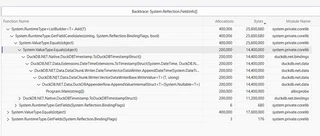
It turns out that the FieldInfo[] allocations are caused by System.ValueType.Equals calls, which in turn are called from DuckDBTimestamp.ToDuckDBTimestampStruct(). Here is the code in DuckDB.NET 1.5.6:
// DuckDB.NET 1.5.6
[StructLayout(LayoutKind.Sequential)]
public readonly struct DuckDBTimestamp(DuckDBDateOnly date, DuckDBTimeOnly time)
{
  public static readonly DuckDBTimestamp PositiveInfinity = new(new DuckDBDateOnly(294247, 1, 10), new DuckDBTimeOnly(4, 0, 54, 775807));
  public static readonly DuckDBTimestamp NegativeInfinity = new(new DuckDBDateOnly(-290308, 12, 21), new DuckDBTimeOnly(23, 59, 59, 999999));

  public DuckDBDateOnly Date { get; } = date;
  public DuckDBTimeOnly Time { get; } = time;

  public bool IsPositiveInfinity => Equals(PositiveInfinity);
  public bool IsNegativeInfinity => Equals(NegativeInfinity);

  public DuckDBTimestampStruct ToDuckDBTimestampStruct()
  {
    if (IsPositiveInfinity) return DuckDBTimestampStruct.PositiveInfinity;   // Equals: the trap
    if (IsNegativeInfinity) return DuckDBTimestampStruct.NegativeInfinity;
    return NativeMethods.DateTimeHelpers.DuckDBToTimestamp(this);            // a native call per value
  }
}

[StructLayout(LayoutKind.Sequential)]
public readonly struct DuckDBDateOnly(int year, byte month, byte day)
{
  public int Year { get; } = year;
  public byte Month { get; } = month;
  public byte Day { get; } = day;
}
In DuckDB.NET 1.5.6 the DuckDBTimestamp didn’t implement any interface or declare Equals, so Equals(PositiveInfinity) ended up calling the ValueType.Equals(Object) method from the ValueType class. This caused two boxing: one for the argument and one for this too. DuckDBTimestamp holds a DuckDBDateOnly and a DuckDBTimeOnly, and both have padding. DuckDBDateOnly has only an int field and two byte fields, so it’s padded to 8 bytes, and DuckDBTimeOnly has three byte fields and an int field, padded the same way. Because of the padding, the ValueType.Equals method can’t take the memory comparison (memcmp) fast path, either for DuckDBTimestamp or for its Date field. It falls back to using reflection, which is slow and causes extra allocations.
The fix is to make DuckDBDateOnly, DuckDBTimeOnly and DuckDBTimestamp implement IEquatable<T>. Now Equals(PositiveInfinity) binds to Equals(DuckDBTimestamp) at compile time, so there’s no box and no reflection.
// DuckDBTimestamp implements IEquatable<DuckDBTimestamp>
public bool Equals(DuckDBTimestamp other) => Date.Equals(other.Date) && Time.Equals(other.Time);

public readonly struct DuckDBDateOnly(int year, byte month, byte day) : IEquatable<DuckDBDateOnly>
{
  public bool Equals(DuckDBDateOnly other) => Year == other.Year && Month == other.Month && Day == other.Day;
  public override bool Equals(object? obj) => obj is DuckDBDateOnly other && Equals(other);
  public override int GetHashCode() => HashCode.Combine(Year, Month, Day);
}
The Visual Studio profiler no longer shows any FieldInfo[] or DuckDBTimestamp allocations, and the boxing is gone too:
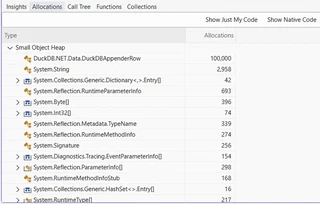
The benchmarks show a speedup of about 7 times for appending 4M DateTime values (1 million rows of 4 columns) and 2.8 GB of allocations going down to 93 KB.
| Method | Job | Mean | Median | Ratio | Allocated | Alloc Ratio |
|---|---|---|---|---|---|---|
| AppendDateTimeToTimestamp | 1-1.5.6 | 778.83 ms | 779.85 ms | 1.00 | 2,937,594.5 KB | 1.000 |
| AppendDateTimeToTimestamp | 2-864e470 | 111.44 ms | 110.93 ms | 0.14 | 92.84 KB | 0.000 |
| AppendDateTimeOffsetToTimestampTz | 1-1.5.6 | 788.73 ms | 787.29 ms | 1.00 | 2,937,594.5 KB | 1.000 |
| AppendDateTimeOffsetToTimestampTz | 2-864e470 | 127.98 ms | 127.58 ms | 0.16 | 92.84 KB | 0.000 |
| AppendDateTimeToDate | 1-1.5.6 | 419.44 ms | 418.64 ms | 1.00 | 1,687,593.82 KB | 1.000 |
| AppendDateTimeToDate | 2-864e470 | 75.41 ms | 75.30 ms | 0.18 | 92.84 KB | 0.000 |
| AppendDateOnlyToDate | 1-1.5.6 | 422.00 ms | 421.19 ms | 1.00 | 1,687,593.82 KB | 1.000 |
| AppendDateOnlyToDate | 2-864e470 | 78.01 ms | 78.00 ms | 0.18 | 92.84 KB | 0.000 |
Converting dates and times by arithmetic
Fixing the trap made appending DateTime values about 7 times faster, but 4M DateTime values still took longer than 8M numeric values. The reason is the last line of ToDuckDBTimestampStruct. To convert a DateTime to a DuckDB timestamp, DuckDB.NET 1.5.6 first split it into year, month, day, hour, minute, second and microsecond with DuckDBTimestamp.FromDateTime. Then it called DuckDB’s duckdb_to_timestamp function to turn these parts back into a single number, the microseconds since 1970-01-01. Dates and times were converted the same way, with duckdb_to_date and duckdb_to_time. So every value was taken apart in .NET, and then a native call put it back together.
As DuckDB stores a DATE the same way, as days since 1970-01-01, we can replace the native calls by doing the same calculation in .NET. DateTime already counts 100 ns ticks since 0001-01-01. So the stored value needs only a subtraction and a division.
// DuckDB.NET 1.5.6.1
internal static class DateTimeExtensions
{
  public const int TicksPerMicrosecond = 10;
  public const int UnixEpochDayNumber = 719_162;                 // DateOnly.FromDateTime(DateTime.UnixEpoch).DayNumber
  public const long UnixEpochTicks = 621_355_968_000_000_000;    // DateTime.UnixEpoch.Ticks

  public static DuckDBDate ToDuckDBDate(this DateTime value)
    => new() { Days = (int)(value.Ticks / TimeSpan.TicksPerDay) - UnixEpochDayNumber };

  public static DuckDBTimestampStruct ToTimestampStruct(this DateTime value, DuckDBType duckDBType)
  {
    var micros = MicrosecondsFromUnixEpoch(value.Ticks);
    return new DuckDBTimestampStruct { Micros = micros };        // shortened: TIMESTAMP_S, _MS and _NS are converted further
  }

  private static long MicrosecondsFromUnixEpoch(long ticks)
    => ticks / TicksPerMicrosecond - UnixEpochTicks / TicksPerMicrosecond;
}
With the arithmetic, appending 4M DateTime values to TIMESTAMP columns went from 110.9 to 29.1 ms. That’s about 3.8 times as fast as after the ValueType trap fix and about 27 times as fast as in 1.5.6. Appending them to DATE columns went from 75.3 to 27.9 ms, about 2.7 times as fast as after the trap fix and 15 times as fast as in 1.5.6. Appending DateTimeOffset values to TIMESTAMPTZ columns goes through the same conversion. It went from 127.6 to 31.6 ms, about 4 times as fast as after the trap fix and 25 times as fast as in 1.5.6:
| Method | Job | Mean | Median | Ratio | Allocated | Alloc Ratio |
|---|---|---|---|---|---|---|
| AppendDateTimeToTimestamp | 1-1.5.6 | 778.83 ms | 779.85 ms | 1.00 | 2,937,594.5 KB | 1.000 |
| AppendDateTimeToTimestamp | 2-864e470 | 111.44 ms | 110.93 ms | 0.14 | 92.84 KB | 0.000 |
| AppendDateTimeToTimestamp | 3-0407f4c | 29.27 ms | 29.08 ms | 0.04 | 92.84 KB | 0.000 |
| AppendDateTimeOffsetToTimestampTz | 1-1.5.6 | 788.73 ms | 787.29 ms | 1.00 | 2,937,594.5 KB | 1.000 |
| AppendDateTimeOffsetToTimestampTz | 2-864e470 | 127.98 ms | 127.58 ms | 0.16 | 92.84 KB | 0.000 |
| AppendDateTimeOffsetToTimestampTz | 3-0407f4c | 31.77 ms | 31.63 ms | 0.04 | 92.84 KB | 0.000 |
| AppendDateTimeToDate | 1-1.5.6 | 419.44 ms | 418.64 ms | 1.00 | 1,687,593.82 KB | 1.000 |
| AppendDateTimeToDate | 2-864e470 | 75.41 ms | 75.30 ms | 0.18 | 92.84 KB | 0.000 |
| AppendDateTimeToDate | 3-0407f4c | 28.05 ms | 27.93 ms | 0.07 | 92.84 KB | 0.000 |
| AppendDateOnlyToDate | 1-1.5.6 | 422.00 ms | 421.19 ms | 1.00 | 1,687,593.82 KB | 1.000 |
| AppendDateOnlyToDate | 2-864e470 | 78.01 ms | 78.00 ms | 0.18 | 92.84 KB | 0.000 |
| AppendDateOnlyToDate | 3-0407f4c | 77.98 ms | 77.73 ms | 0.18 | 92.84 KB | 0.000 |
Appending DateOnly values didn’t get faster. Both CreateRow and the AppendRow callback give you an IDuckDBAppenderRow, and in 1.5.6.1 the interface has no AppendValue(DateOnly?) overload. Only the DuckDBAppenderRow class has one. So the DateOnly is converted implicitly to DuckDBDateOnly, and DuckDBDateOnly.ToDuckDBDate() still calls duckdb_to_date. The mapped appender, function results and parameters don’t go through the interface, so they use the arithmetic for DateOnly too. Adding the overload to the interface would make some existing calls ambiguous, so it will be added in DuckDB.NET 2.0.
Reading dates and times
In DuckDB.NET 1.5.6, reading 4M timestamps as DateTime took 118 ms, more than twice as long as reading 8M int values (55 ms). Per value, a timestamp was about four times as slow as an integer. The reason is that DuckDB.NET 1.5.6 asked DuckDB to split every stored value into parts and then built the .NET value from those parts. Before that, it made one more native call to check whether the value was infinity. As a result, most of that time went into calls to DuckDB. Here is what reading a TIMESTAMP column as DateTime looked like in 1.5.6:
// DuckDB.NET 1.5.6, DateTimeVectorDataReader
private T ReadTimestamp<T>(ulong offset)
{
  var timestampStruct = GetFieldData<DuckDBTimestampStruct>(offset);

  // duckdb_is_finite_timestamp
  if (!timestampStruct.IsFinite(DuckDBType))
  {
    ...
  }

  // duckdb_from_timestamp
  var (timestamp, additionalTicks) = timestampStruct.ToDuckDBTimestamp(DuckDBType);

  if (typeof(T) == typeof(DateTime))
  {
    // new DateTime(year, month, day).AddTicks(...)
    return (T)(object)timestamp.ToDateTime().AddTicks(additionalTicks);
  }
  ...
}
A DATE went through duckdb_is_finite_date and duckdb_from_date the same way, and a TIME and a TIMETZ through duckdb_from_time and duckdb_from_time_tz. So reading a date or a timestamp made two native calls per value, and reading a time made one.
Testing for infinity without a native call
DuckDB stores positive infinity as int.MaxValue days for a DATE and as long.MaxValue for a timestamp, in every unit. Negative infinity is the same number with a minus sign. It turns out that’s all duckdb_is_finite_date and the four duckdb_is_finite_timestamp functions check. DuckDB.NET already had these markers as constants, because it can write infinity too, so instead of asking DuckDB, DateTimeVectorDataReader can compare the stored value with them itself:
// DuckDB.NET 1.5.6.1, DuckDBTimestampStruct
public bool IsInfinity => IsPositiveInfinity || IsNegativeInfinity;
public bool IsPositiveInfinity => Micros == long.MaxValue;
public bool IsNegativeInfinity => Micros == -long.MaxValue;
Converting the stored value by arithmetic
Reading does the same arithmetic as appending, only backwards. DuckDB.NET 1.5.6.1 now turns the stored days or microseconds into ticks with a multiplication and an addition, and checks the range with a single comparison:
// DuckDB.NET 1.5.6.1, DateTimeVectorDataReader
private T ReadTimestamp<T>(ulong offset)
{
  if (typeof(T) == typeof(DateTime))
  {
    return (T)(object)new DateTime(GetTicks(offset, typeof(DateTime)));
  }
  ...
}

private long GetTicks(ulong offset, Type targetType)
{
  var timestamp = GetFieldData<DuckDBTimestampStruct>(offset);

  // In the unit of the column. TIMESTAMP_NS has its own branch
  var units = timestamp.Micros;

  // One comparison for both ends of the range
  if ((ulong)(units - minimumUnits) > (ulong)(maximumUnits - minimumUnits))
  {
    throw TimestampOutOfRange(timestamp, targetType);
  }

  return UnixEpochTicks + units * ticksPerUnit;
}
The infinity markers are outside the range of a DateTime, so the same comparison catches them, and reading a TIMESTAMP as DateTime doesn’t test for infinity separately any more. TIME and TIMETZ are converted the same way. With these changes, no read of a date or time column as a .NET type calls into DuckDB. Only the DuckDB* structs still call DuckDB, because they hold the value split into parts, such as the year, month and day, and DuckDB still does the splitting.
Reading DateOnly, DateTimeOffset and TimeOnly without generic virtual methods
Part 1 showed how plain virtual methods such as ReadInt64 and ReadDateTime replaced the generic virtual call for every type that DbDataReader has a getter for. DbDataReader has no GetDateOnly, GetDateTimeOffset or GetTimeOnly, so these types are read with GetFieldValue<T>, and they still went through the generic virtual GetValidValue<T> and its CORINFO_HELP_VIRTUAL_FUNC_PTR lookup on every value. While the conversion went through DuckDB, the lookup didn’t matter much. With the conversion down to a few instructions, the lookup became most of the read. After the arithmetic change, reading a TIME as TimeOnly still took twice as long as reading it as DateTime. The fix is the same as in part 1: two more methods in the VectorDataReaderBase class, ReadDateOnly and ReadDateTimeOffset, and a third one, ReadTimeOnly.
With all these changes, reading dates, times and timestamps is 3 to 12 times as fast. Reading 4M timestamps as DateTime (1 million rows of 4 columns) went from 118.1 to 11.2 ms, and reading DATE columns as DateOnly from 70.1 to 5.8 ms. DateTimeOffset gains the least, because most of what’s left of that read is its constructor, which validates the offset:
| Method | Job | Mean | Median | Ratio |
|---|---|---|---|---|
| ReadTimestampsAsDateTime | 1.5.6 | 112.977 ms | 118.117 ms | 1.00 |
| ReadTimestampsAsDateTime | 1.5.6.1 | 11.148 ms | 11.154 ms | 0.10 |
| ReadTimestampNsAsDateTime | 1.5.6 | 119.199 ms | 121.705 ms | 1.00 |
| ReadTimestampNsAsDateTime | 1.5.6.1 | 12.066 ms | 12.062 ms | 0.10 |
| ReadTimestampTzAsDateTimeOffset | 1.5.6 | 115.433 ms | 115.574 ms | 1.00 |
| ReadTimestampTzAsDateTimeOffset | 1.5.6.1 | 36.709 ms | 36.711 ms | 0.32 |
| ReadTimestampsWithGetValue | 1.5.6 | 127.074 ms | 127.075 ms | 1.00 |
| ReadTimestampsWithGetValue | 1.5.6.1 | 28.540 ms | 27.643 ms | 0.22 |
| ReadDatesAsDateTime | 1.5.6 | 70.384 ms | 68.355 ms | 1.00 |
| ReadDatesAsDateTime | 1.5.6.1 | 6.655 ms | 6.654 ms | 0.09 |
| ReadDatesAsDateOnly | 1.5.6 | 70.286 ms | 70.072 ms | 1.00 |
| ReadDatesAsDateOnly | 1.5.6.1 | 5.785 ms | 5.823 ms | 0.08 |
| ReadTimesAsTimeOnly | 1.5.6 | 54.097 ms | 54.297 ms | 1.00 |
| ReadTimesAsTimeOnly | 1.5.6.1 | 7.404 ms | 7.407 ms | 0.14 |
| ReadTimesAsDateTime | 1.5.6 | 61.163 ms | 60.807 ms | 1.00 |
| ReadTimesAsDateTime | 1.5.6.1 | 7.689 ms | 7.681 ms | 0.13 |
| ReadTimeTzAsDateTimeOffset | 1.5.6 | 72.661 ms | 72.727 ms | 1.00 |
| ReadTimeTzAsDateTimeOffset | 1.5.6.1 | 18.778 ms | 18.776 ms | 0.26 |
Appending without boxing
In the How a value is appended section, we saw that every VectorDataWriterBase.WriteValue<T> call selects the write method with a switch. Because value is a generic T, switching on the value and testing with int val boxes the value first and then checks its type. For a plain value type such as int the JIT removes the box, but for a nullable type such as int? or for a C# enum it can’t. This caused unnecessary boxing when appending nullable values with the mapped appender or lists with nullable items. The mapped appender has a switch of its own that is written the same way, so it boxed the nullable before the value even reached WriteValue<T>. As we saw in Hidden boxing, each box is an allocation, and the garbage collector has to clean it up later.
Nullable properties in the mapped appender
The mapped appender reads each property with a getter delegate and passes the value to AppendToRow, which picks the AppendValue overload with its own switch:
// DuckDB.NET 1.5.6, PropertyMapping<T, TProperty>
public void AppendToRow(IDuckDBAppenderRow row, T record)
{
  var value = Getter(record);   // TProperty, for example int?

  if (value is null)
  {
    row.AppendNullValue();
    return;
  }

  _ = value switch
  {
    string v => row.AppendValue(v),
    int v => row.AppendValue(v),
    long v => row.AppendValue(v),
    DateTime v => row.AppendValue(v),
    ...
  };
}
For an int? property, TProperty is int?. To test a generic value against a type, as int v does, the value is boxed first and then the type of the box is checked. On .NET 10.0.14, x64, the Tier1 code of AppendToRow for an int? property shows what happens (edited for brevity):
; DuckDB.NET 1.5.6, PropertyMapping<Record, int?>.AppendToRow
  call     [rax+0x18]System.Func`2[...]:Invoke   ; the getter
  ...
  cmp      byte  ptr [rsp+0x30], 0               ; value is null?
  je       SHORT G_M000_IG06                     ; yes: AppendNullValue
  lea      rdx, [rsp+0x30]
  mov      rcx, 0x7FFA27094188
  call     CORINFO_HELP_BOX_NULLABLE             ; box the int? into a new object
  mov      esi, dword ptr [rax+0x08]             ; read the int back out of the box
  ...
  call     [DuckDB.NET.Data.DataChunk.Writer.VectorDataWriterBase:WriteValue[int](int,ulong):this]
The JIT keeps only the int v arm of the switch, but it still boxes the value and then reads the int straight back out of the box. So every int? value that isn’t null allocates a 24-byte object only to get 4 bytes back.
The fix is to check for a nullable type before the switch, without testing the value itself. Every AppendValue overload for a value type already takes a nullable, so the value can be passed on as it is:
// DuckDB.NET 1.5.6.1, PropertyMapping<T, TProperty>
public void AppendToRow(IDuckDBAppenderRow row, T record)
{
  var value = Getter(record);

  // Both conditions are constants for the JIT
  if (typeof(TProperty).IsValueType && default(TProperty) is null)
  {
    AppendNullable(row, ref value);
    return;
  }
  ...
}

private static void AppendNullable(IDuckDBAppenderRow row, ref TProperty value)
{
  if (typeof(TProperty) == typeof(int?)) row.AppendValue(Unsafe.As<TProperty, int?>(ref value));
  else if (typeof(TProperty) == typeof(long?)) row.AppendValue(Unsafe.As<TProperty, long?>(ref value));
  ...
}
The checks in AppendNullable, such as typeof(TProperty) == typeof(int?), compare two types that the JIT already knows when it compiles the method for an int? property. The result is a constant, so only the int? line is left. For an int property, the check in AppendToRow is always false, and the JIT removes it. As a result, for an int? property, AppendToRow calls AppendValue(int?) directly, with no type test and no box.
With the fix, appending 1M records with eight int? properties is 1.6 times as fast as in 1.5.6 (186.7 against 116.2 ms). The 181 MB of allocations goes down to 186 KB:
| Method | Job | Mean | Ratio | Allocated | Alloc Ratio |
|---|---|---|---|---|---|
| AppendNullableIntProperties | 1-1.5.6 | 186.66 ms | 1.00 | 185,342.15 KB | 1.000 |
| AppendNullableIntProperties | 3-56c6f90 | 116.19 ms | 0.62 | 186.15 KB | 0.001 |
Nullable items in lists
Appending a list goes through the collection writer, which walks the items and calls WriteValue<T> for each of them:
// DuckDB.NET 1.5.6, CollectionVectorDataWriter
private int WriteItems<T>(IEnumerable<T> items, ulong start)
{
  var index = 0ul;

  foreach (var item in items)
  {
    ItemWriter.WriteValue(item, start + (index++));
  }

  return 0;
}
For a List<int?>, T is int?, so every item that isn’t null goes through the switch in WriteValue<int?> and gets boxed there. The reason is the same as for a nullable property in the switch of the mapped appender. On .NET 10.0.14, x64, the Tier1 code of WriteValue<int?> has the same box (edited for brevity):
; DuckDB.NET 1.5.6, VectorDataWriterBase.WriteValue<int?>
  movzx    rdx, dl                      ; HasValue
  test     edx, edx
  je       SHORT G_M000_IG04            ; null: WriteNull
  lea      rdx, [rsp+0x48]
  mov      rcx, 0x7FFA27084188
  call     CORINFO_HELP_BOX_NULLABLE    ; box the int? into a new object
  mov      edi, dword ptr [rax+0x08]    ; read the int back out of the box
  ...
  call     rax                          ; AppendNumeric<int>
The fix is the same as in the mapped appender. WriteValue<T> checks for a nullable type before the switch and sends the value to WriteNullable. WriteNullable has one line per type, and each line calls the same method that the switch calls for the type under the nullable:
// DuckDB.NET 1.5.6.1, VectorDataWriterBase
public void WriteValue<T>(T value, ulong rowIndex)
{
  ...
  // Both conditions are constants for the JIT
  if (typeof(T).IsValueType && default(T) is null)
  {
    WriteNullable(ref value, rowIndex);
    MarkValid(rowIndex);
    return;
  }

  _ = value switch
  ...
}

private void WriteNullable<T>(ref T value, ulong rowIndex)
{
  if (typeof(T) == typeof(int?)) AppendNumeric(Unsafe.As<T, int?>(ref value).GetValueOrDefault(), rowIndex);
  else if (typeof(T) == typeof(long?)) AppendNumeric(Unsafe.As<T, long?>(ref value).GetValueOrDefault(), rowIndex);
  ...
}
With the fix, appending 1M lists of ten int? items, one in ten of them null, is 1.8 times as fast as in 1.5.6 (197.5 against 107.6 ms). An int?[] of the same items is 2.3 times as fast (182.8 against 78.8 ms). Both allocated 206 MB in 1.5.6 and 77 KB now:
| Method | Job | Mean | Median | Ratio | Allocated | Alloc Ratio |
|---|---|---|---|---|---|---|
| AppendNullableIntLists | 1-1.5.6 | 197.73 ms | 197.46 ms | 1.00 | 211,017.52 KB | 1.000 |
| AppendNullableIntLists | 5-40b625b | 107.71 ms | 107.56 ms | 0.54 | 77.4 KB | 0.000 |
| AppendNullableIntArrays | 1-1.5.6 | 183.48 ms | 182.76 ms | 1.00 | 211,017.52 KB | 1.000 |
| AppendNullableIntArrays | 5-40b625b | 78.81 ms | 78.77 ms | 0.43 | 77.4 KB | 0.000 |
After the boxing fix, a List<int?> was still slower than an array of the same items. Walking the list as a span made it as fast. In 1.5.6.1, appending the lists takes 76.4 ms, against 107.6 ms after the boxing fix. The reason is a detail of how the CPU forwards stored values to later loads, which part 4 explains:
| Method | Job | Mean | Median | Ratio | Allocated | Alloc Ratio |
|---|---|---|---|---|---|---|
| AppendNullableIntLists | 1-1.5.6 | 197.73 ms | 197.46 ms | 1.00 | 211,017.52 KB | 1.000 |
| AppendNullableIntLists | 5-40b625b | 107.71 ms | 107.56 ms | 0.54 | 77.4 KB | 0.000 |
| AppendNullableIntLists | 6-1.5.6.1 | 76.66 ms | 76.43 ms | 0.39 | 77.4 KB | 0.000 |
C# enums
C# enums had the same problem, with two boxes per value. They are now appended as their numeric value, which makes them 2.5 times as fast. For 1M rows of four ENUM columns, allocations go down from 183 MB to 292 KB.
Writing short strings straight into the vector
In 1.5.6, appending a string was always a native call. StringVectorDataWriter passed the string to DuckDB’s duckdb_vector_assign_string_element function:
// DuckDB.NET 1.5.6, StringVectorDataWriter
internal override bool AppendString(string value, ulong rowIndex)
{
  NativeMethods.Vectors.DuckDBVectorAssignStringElement(Vector, rowIndex, value);
  return true;
}
For every string, the marshaller of the native call encodes the string to UTF-8 and adds a zero byte at the end, because the function takes a C string. DuckDB then walks the bytes again to find that zero byte and get the length, checks that the bytes are valid UTF-8, and copies them into the vector. The check can never fail, because the bytes come from .NET’s own encoder.
DuckDB stores every string as a 16-byte value. The first 4 bytes hold the length, and a string of up to 12 bytes fits in the other 12. A longer string keeps its first 4 bytes and a pointer to the whole string there, and the whole string goes into a heap that belongs to the vector. So a short string doesn’t need DuckDB at all, and 1.5.6.1 writes it straight into the vector in DuckDB’s layout:
// DuckDB.NET 1.5.6.1, StringVectorDataWriter
internal override bool AppendString(string value, ulong rowIndex)
{
  if (value.Length > InlineLength)
  {
    return AppendLongString(value, rowIndex);
  }

  // Starts as zeros: DuckDB compares all 12 bytes, so the bytes after the string have to be zero
  DuckDBString._value_e__Union.DuckDBStringInlined inline = default;
  var bytes = new Span<byte>(inline.inlined, InlineLength);

  if (!Encoding.UTF8.TryGetBytes(value, bytes, out var length))
  {
    // More than 12 bytes in UTF-8
    return AppendLongString(value, rowIndex);
  }

  inline.length = (uint)length;
  ...
  return AppendValueInternal(inline, rowIndex);
}
A longer string is encoded on the stack, or into an array from ArrayPool above 170 characters, and handed to duckdb_unsafe_vector_assign_string_element_len together with its length. That function skips the UTF-8 check, and DuckDB no longer has to look for the end of the string. A long string still takes a native call, but less work happens inside it.
Together with the changes from the beginning of this post, short strings append about twice as fast as in 1.5.6. Appending 500,000 rows of four columns of short ASCII strings (5 to 8 characters) takes 59.3 ms, against 128.8 ms in 1.5.6. Short Georgian strings have 4 characters, but each character takes 3 bytes in UTF-8, so they fill all 12 inline bytes. They are 2.5 times as fast. Strings longer than 12 bytes still go through DuckDB and gain less. ASCII strings of 40 and 300 characters are 1.3 to 1.4 times as fast, and Georgian strings of 30 characters 1.8 times:
| Method | Job | Mean | Median | Ratio |
|---|---|---|---|---|
| AppendShortAscii | 1.5.6 | 128.99 ms | 128.84 ms | 1.00 |
| AppendShortAscii | 1.5.6.1 | 61.68 ms | 59.29 ms | 0.48 |
| AppendMediumAscii | 1.5.6 | 176.96 ms | 176.60 ms | 1.00 |
| AppendMediumAscii | 1.5.6.1 | 130.46 ms | 130.49 ms | 0.74 |
| AppendLongAscii | 1.5.6 | 304.90 ms | 305.39 ms | 1.00 |
| AppendLongAscii | 1.5.6.1 | 233.87 ms | 232.32 ms | 0.77 |
| AppendShortGeorgian | 1.5.6 | 140.71 ms | 140.73 ms | 1.00 |
| AppendShortGeorgian | 1.5.6.1 | 55.40 ms | 55.29 ms | 0.39 |
| AppendMediumGeorgian | 1.5.6 | 298.44 ms | 311.02 ms | 1.00 |
| AppendMediumGeorgian | 1.5.6.1 | 170.13 ms | 170.42 ms | 0.57 |
All the appender changes together
The mapped appender got one more change. Its mappings used to append through the IDuckDBAppenderRow interface and were stored in a List that was walked with foreach for every record. Now each mapping gets the row as the DuckDBAppenderRow class, so every AppendValue is a direct call, and the mappings are an array walked by index. With this and the other changes, appending 1M records with eight int? properties takes 90.0 ms in 1.5.6.1, about twice as fast as in 1.5.6:
| Method | Job | Mean | Ratio | Allocated | Alloc Ratio |
|---|---|---|---|---|---|
| AppendNullableIntProperties | 1-1.5.6 | 186.66 ms | 1.00 | 185,342.15 KB | 1.000 |
| AppendNullableIntProperties | 6-1.5.6.1 | 89.97 ms | 0.48 | 186.23 KB | 0.001 |
What’s next
The next post covers 128-bit values and decimals. Reading UUID, HUGEINT and wide DECIMAL values got faster, and decimals are now appended by integer arithmetic, with a gain that depends on the CPU. All the changes in this series are in DuckDB.NET 1.5.6.1 on NuGet, and they carry over to DuckDB.NET 2.0. To upgrade, run:
dotnet add package DuckDB.NET.Data.Full --version 1.5.6.1
DuckDB.NET.Data.Full includes the native DuckDB library. If you supply the library yourself, use DuckDB.NET.Data instead.


I’m a backend engineer and software architect with 17+ years of .NET, mostly in banking and fintech: payment and transaction processing, public APIs, and the internal platforms other teams build on. I’ve led teams and a platform unit, and I stay hands-on in the code, increasingly through AI coding agents like Claude Code and Codex.
Alongside that, I build open-source .NET libraries and developer tools with 44M+ NuGet downloads: DuckDB.NET, EntityFramework.Exceptions, EFCore.Visualizer and others. That work sits where .NET meets the database: native interop, Native AOT extensions for DuckDB and PostgreSQL, and tooling that makes query plans easier to debug. I also speak about .NET and databases at conferences like NDC, KCDC and .NET Conf.